Choosing Watercolor Honey Bee Gnomes Clipart for Creative Projects
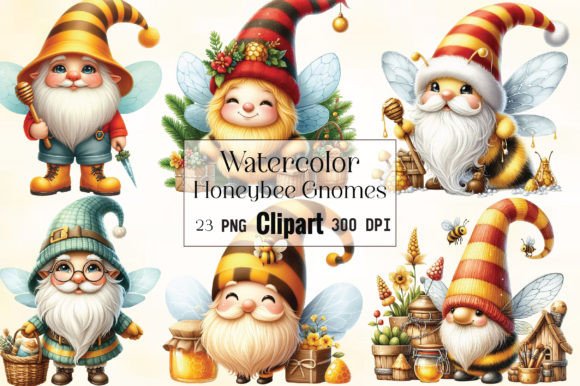
When you are planning a creative project, whether it involves sublimation printing, card making, or digital scrapbooking, the choice of graphic assets can significantly influence the final result. One option that has drawn attention is Watercolor Honey Bee Gnomes Clipart, a digital product offering 23 individual PNG files. Each file is crafted at 300 dpi, measures 12×12 inches (3600 x 3600 pixels), and includes a transparent background. Understanding what this set offers, how it compares with other clipart styles, and when it fits best can help you decide whether it aligns with your specific needs.
What Makes Watercolor Honey Bee Gnomes Clipart Distinct
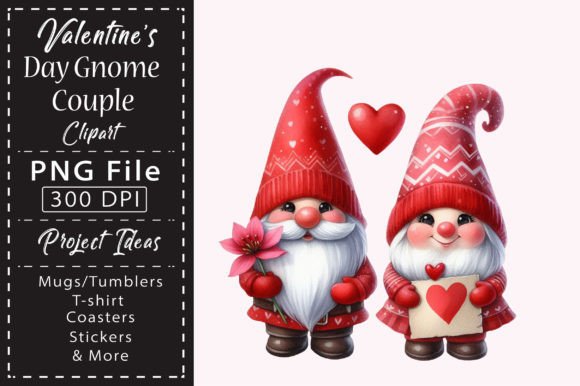
At its core, this clipart set combines three visual elements: watercolor texture, honey bee motifs, and gnome characters. The watercolor technique gives the illustrations a soft, hand-painted look that differs from flat vector graphics or highly detailed digital paintings. Each gnome is rendered with gentle color transitions, subtle brushstroke effects, and a slightly organic edge that mimics real water media on paper.
The honey bee theme adds a warm, nature-inspired layer to the gnome concept. Bees, honeycombs, and floral accents appear alongside the gnomes, creating a cohesive whimsical theme. For someone working on spring-themed decor, garden party invitations, or nature-inspired merchandise, this thematic direction offers a ready-made aesthetic that does not require additional compositing.
Another distinguishing feature is the file specification itself. Each PNG is sized at 12×12 inches with a 300 dpi resolution, which translates to 3600 pixels per side. This resolution supports printing at relatively large sizes without noticeable pixelation. The transparent background also simplifies layering in editing software like Photoshop, Procreate, or Affinity Designer, allowing you to place the gnomes directly onto patterned backgrounds, solid colors, or photographs without manual masking.
Comparison with Vector-Based Clipart
One of the most common alternatives to watercolor PNG clipart is vector-based clipart, often provided in EPS, SVG, or AI formats. Vectors offer infinite scalability because they rely on mathematical paths rather than fixed pixels. If your project involves large-format printing, such as posters, banners, or fabric prints that exceed 12×12 inches, vectors may provide more flexibility without resolution concerns.
However, vectors typically lack the natural, textured appearance of watercolor. Flat vectors often look clean and modern, but they may not convey the same handmade warmth that a watercolor effect provides. Watercolor Honey Bee Gnomes Clipart sits in a middle ground—it offers a painterly look while still being digital and easy to use. The tradeoff is that you cannot scale these PNGs infinitely; if you need a gnome that spans several feet, you may need to upscale the image using software, which can introduce artifacts depending on the original quality.
Comparison with Photographic or Realistic Clipart
Some clipart sets lean toward photorealism, using detailed shading and lifelike textures. Realistic bee or gnome imagery can work well for educational materials, scientific illustrations, or branding that requires a serious tone. The watercolor style, by contrast, leans into a softer, more decorative look. It is less about accuracy and more about mood and charm.
If your audience expects a polished, professional feel, realistic clipart might be the safer route. But if you are designing for a playful market—children's products, casual apparel, or hobby crafts—the watercolor approach can feel more approachable and unique. Watercolor Honey Bee Gnomes Clipart occupies a niche that is neither hyper-real nor purely abstract, making it suitable for intermediate uses where a light, artistic touch is desired.
Strengths of This Clipart Set
One strength is the number of files included. With 23 distinct PNGs, you receive a variety of poses, expressions, and accessories. This variety can reduce the need to purchase multiple sets for a single project. For a card maker designing a series of greeting cards, having multiple gnome variations within the same style ensures visual consistency without repetition.
The resolution also supports both digital and print use. At 3600 pixels per side, you can print a gnome at up to 12 inches across at full quality. If you need smaller prints, you can downsample without issue. This flexibility is practical for product designers who create items at different scales, from stickers measuring two inches to tote bags requiring a larger focal graphic.
Transparent backgrounds are another practical advantage. When you import a PNG with transparency into a design application, you can position it over any background color or pattern without a white box around it. This saves time compared to clipping or erasing backgrounds from JPEG images. For sublimation printing, transparent PNGs are especially useful because they allow the design to merge cleanly with the substrate.
Limitations to Consider
Despite its strengths, Watercolor Honey Bee Gnomes Clipart has limitations worth evaluating. The file format is PNG, which is raster-based. If you need to edit individual elements within a gnome—for example, change the color of a hat or separate the bee from the gnome—you are constrained by the fact that each file is a flattened image. You cannot easily isolate components without using complex selection tools in photo editing software.
Additionally, the watercolor style introduces natural variation in opacity and edge softness. Some users may find certain elements too faint or lacking contrast when printed on light-colored materials. Testing a sample print before committing to a large production run is advisable, especially if you plan to use the clipart on fabrics or other absorbent surfaces.
Color shift is another factor to keep in mind. The product description notes that color may vary slightly depending on the monitor used for viewing. What looks vibrant on your screen may appear duller or more saturated on another display, and printed colors will depend on your printer profile, ink, and paper type. Ordering a physical proof or running small test prints can help you assess how the colors behave in your specific workflow.
When Watercolor Honey Bee Gnomes Clipart Is a Good Fit
This clipart set tends to work well for projects that benefit from a cohesive theme and a handcrafted look. Some realistic examples include:
- Seasonal merchandise: Spring and summer products such as garden party invitations, bee-themed nursery decor, or farmers' market signage can leverage the honey bee motif directly.
- Sublimation blanks: Mugs, tumblers, coasters, and polyester apparel often print best with high-contrast, textured designs. The 300 dpi resolution supports this application well.
- Digital scrapbooking: The transparent backgrounds allow easy layering onto patterned digital papers. The watercolor style complements other watercolor elements you may already have.
- Small-scale home decor: Framed prints, pillow covers, and tote bags featuring these gnomes can add a whimsical accent without requiring a massive file size.
The set is also a practical choice if you value creative flexibility within a constrained budget. Instead of commissioning custom illustrations for a small project, you can start with these 23 assets and adjust them through compositing, text overlays, or color filtering in your design software.
When You Might Need a Different Option
There are situations where Watercolor Honey Bee Gnomes Clipart may not be the optimal choice. For example:
- Large-format printing: If your project requires a gnome to span 24 inches or more, the 3600-pixel dimension may limit clarity. In that case, vector clipart or a higher-resolution raster source would be more appropriate.
- Editable character design: If you plan to animate the gnomes or modify poses significantly, a layered source file (PSD, AI, or SVG) would better support those changes. The PNG format does not offer layer separation.
- Corporate or professional branding: For a business that needs a clean, modern identity, the watercolor style might feel too casual or fragile. Flat vectors or geometric icons could align better with a professional tone.
- Color-critical reproduction: In packaging or branding where exact Pantone matching is required, relying on a raster clipart set can introduce color inconsistency. A vector file with defined color swatches would provide more predictable results.
Practical Considerations Before Purchasing
Before deciding, it helps to assess your own workflow and output requirements. Ask yourself a few questions:
- What media will you print on? Sublimation and inkjet printing on fabric can handle the watercolor texture well, but laser printing on coated paper may reduce the soft transitions.
- How will you use the files? If you plan to resize the gnomes dramatically, test scaling a sample in your software. Most editing programs can upscale by 200–300% before quality degrades noticeably, but beyond that you may see softening.
- Do you need customization? If you want to change the gnome’s hat color or remove the bee, you will need to use selection tools in Photoshop or similar software. This is feasible but time-consuming if you have many variations.
- What is your typical project volume? For one-off crafts, a 23-file set offers plenty of variety. For high-volume production across many products, you may want additional assets or the ability to batch edit colors.
Extraction and File Management
The files are delivered in a single ZIP archive. After downloading, you will need to extract them using software like WinZip, WinRAR, or built-in operating system tools. This is a standard process for digital clipart bundles, but if you are not familiar with ZIP files, it is worth noting that you must unzip before importing into design applications. Keeping the extracted files organized in a dedicated folder can save time when browsing for the right gnome later.
Making an Informed Decision
Watercolor Honey Bee Gnomes Clipart represents a specific intersection of style, format, and theme. It is not a universal solution, but it does serve a clear purpose for crafters, small business owners, and designers who need ready-made, visually cohesive graphics for whimsical or nature-inspired projects. By comparing its strengths and limitations with alternatives like vector clipart, realistic imagery, or layered source files, you can identify whether it aligns with your workflow, output medium, and aesthetic goals.
Consider testing a single file in your usual design software before committing to a large batch of products. This quick step can reveal how the watercolor texture interacts with your printer, your preferred paper or fabric, and the overall look you are trying to achieve. If the result matches your vision, the set provides a convenient way to maintain a consistent theme across multiple items without designing every element from scratch.
Ultimately, the best choice depends on your project requirements, your comfort with raster versus vector editing, and the tone you want to convey. Weighing these factors carefully will help you decide whether this clipart set is the right fit for your next creative endeavor.