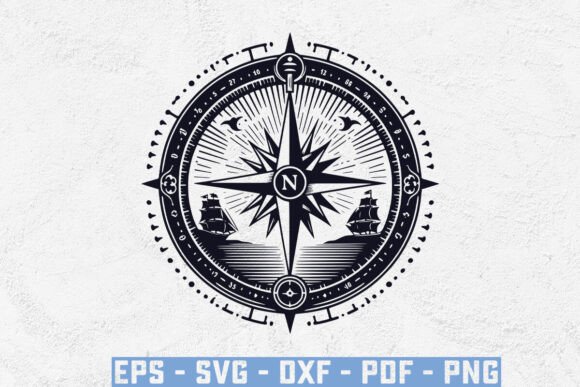
Compass with a Ship SVG & Cruise Ship SVG
A single graphic can anchor an entire creative project. When that graphic combines navigation symbols with maritime travel motifs, you get a tool that works across branding, home décor, apparel, and stationery. The Compass with a Ship SVG, Cruise Ship SVG set delivers exactly that versatility. Packed in a single digital bundle, you receive an SVG, EPS, PNG, DXF, and a print-ready PDF, all sized at 15 x 18 inches with a crisp 300 dpi resolution. Whether you run a small print shop, design social media templates, or craft handmade gifts, this collection invites you to adapt, remix, and produce original work without starting from scratch.
What Makes This Nautical SVG Collection Stand Out
Design resources need to balance detail with clean cut lines. The Compass with a Ship SVG, Cruise Ship SVG set achieves this by offering a single, carefully crafted illustration that works equally well on a cutting machine and in digital layout software. The 15 x 18 inch canvas gives you plenty of room for scaling while maintaining sharpness, and the 300 dpi ensures printed output stays crisp even at larger sizes.
Having five file formats in one download removes the usual conversion hassle. The SVG and EPS suit vector editing programs like Adobe Illustrator, Inkscape, or Affinity Designer. The PNG offers a transparent background for quick mockups or web use. The DXF imports directly into Silhouette Studio, Cricut Design Space, and other cutting software. And the PDF provides a print-ready version for direct use or proofing before you commit to a production run.
This bundle is licensed for personal and commercial projects, meaning you can create finished products to sell. What you cannot do is resell the digital files themselves. That distinction matters for small business owners and freelancers who need to know which assets are safe to monetize. The freedom to produce merchandise, packaging, or digital content from these graphics makes them a practical addition to any creative toolkit.
Creative Applications for Designers and Small Business Owners
Brand identity relies on consistent visual language. A compass rose combined with a cruise ship silhouette can anchor a coastal-themed brand, whether for a travel agency, a beachside café, or a nautical apparel line. Use the SVG to build logos, social media headers, or website icons. Because the vector file is resolution-independent, scaling it to fit a business card or a storefront sign takes seconds.
For product packaging, the Compass with a Ship SVG, Cruise Ship SVG works as a central graphic or a subtle background element. Suppose you run a small candle business with ocean-inspired scents. Print the design onto kraft paper labels using the PDF or PNG, or cut the shape from adhesive vinyl to create custom jar decals. The same graphic can appear on hang tags, thank-you cards, and even shipping inserts, reinforcing your brand without needing separate artwork for each touchpoint.
Marketers can also adapt the design for digital campaigns. Drop the PNG into Canva or Photoshop to create Instagram posts highlighting travel deals, vacation packages, or maritime-themed events. Pair it with a bold sans-serif font for modern ads or a script font for a vintage postcard feel. The transparent background makes layering effortless, saving time on every asset.
Project Ideas for Hobbyists and DIY Enthusiasts
Home décor benefits from cohesive themes, and nautical designs remain popular across living rooms, beach houses, and offices. Cut the Compass with a Ship SVG, Cruise Ship SVG from adhesive vinyl and apply it to a wooden sign, a mirror frame, or a glass cabinet door. Alternatively, use the DXF version to engrave the design onto plywood or acrylic with a laser cutter, then mount the result as wall art. The 15 x 18 inch size suits medium-scale projects without requiring excessive material.
Apparel projects also pair well with this graphic. Heat-transfer vinyl applied to a tote bag, a denim jacket, or a T-shirt creates a custom piece that feels intentional rather than generic. If you prefer embroidery, import the SVG into embroidery digitizing software and convert the design into stitch patterns. The clean lines of the compass and ship translate well into thread work, especially when you limit the color palette to one or two shades.
Stationery enthusiasts can print the PDF directly onto cardstock to create greeting cards, thank-you notes, or party invitations for a maritime-themed celebration. The single-sheet format works for flat cards, and if you fold the card, the graphic can appear on the front with a blank interior for your message. Add a metallic foil effect by printing onto laser-compatible foil paper to elevate the final result.
Adapting the Designs for Different Platforms and Formats
Each platform demands a slightly different approach. For print-on-demand services like Printful or Redbubble, the PNG gives you a ready-to-upload file with a transparent background. You can place it on shirts, hoodies, pillows, or phone cases. Because the graphic is centered and balanced at 15 x 18 inches, it fits standard product mockups without heavy repositioning.
For Etsy sellers or Shopify store owners, the SVG and DXF files open up physical product possibilities. Create a digital cut file listing for other crafters, provided you supply the file as part of a project kit rather than selling the design alone. You can also bundle the design with additional elements like borders, anchors, or waves to build a themed collection that attracts niche buyers.
Educators and workshop leaders can use the PDF as a teaching tool. Hand it out during a design basics session to demonstrate contrast, line weight, and composition. Let students trace the Compass with a Ship SVG, Cruise Ship SVG by hand or digitally to understand how vector shapes are constructed. The single-design focus keeps the lesson clear and avoids overwhelming beginners with too many variables.
Practical Tips for Working with SVG and DXF Files
When you open the SVG in vector software, check whether the design contains grouped elements. If you want to change the color of the ship separately from the compass, ungroup the layers and apply fills or strokes to individual shapes. This technique is especially useful when creating multicolor cuts for layered vinyl projects.
For cutting machines, import the DXF file directly into your software. Verify the size matches your material dimensions; sometimes the design imports at a different scale depending on the program. Use the resize tool to adjust while maintaining the aspect ratio. A test cut on scrap paper or cheap vinyl helps confirm that the details cut cleanly before you use premium materials.
If you want to modify the design, stay in vector format as long as possible. Rasterizing early introduces pixelation and removes the ability to scale cleanly. Keep an original backup of the SVG or EPS in a separate folder so you can always return to the unaltered file if an edit goes wrong.
File organization also saves time. Name your cut files clearly—compass-ship-final.svg rather than untitled-3.svg—and store them in a project-specific folder. When you work across multiple files for one project, consistent naming prevents confusion and accidental exports of the wrong version.
How to Maintain Consistency Across Your Creative Projects
A single graphic can unify a collection of products, but consistency requires deliberate choices. Decide on a color palette before you start. Nautical themes often work well with navy, white, gold, and natural wood tones. Once you set those colors, apply them across every item in your line, from stickers to fabric prints.
Consider the placement of the Compass with a Ship SVG, Cruise Ship SVG on each product. If you center it on a T-shirt, center it on the matching tote bag and coffee mug. Consistent placement makes your product line feel cohesive even when the items are made from different materials. If you scale the design for smaller products like pins or keychains, keep the proportions identical to maintain brand recognition.
Typography also plays a role. Pair the graphic with one or two fonts that complement the nautical theme—a clean sans-serif for modern projects or a serif with subtle flourishes for a vintage look. Use the same fonts on packaging, labels, and promotional images to reinforce the visual identity.
Testing across formats ensures that your final products match your digital mockups. The PNG you see on screen may print slightly darker or lighter depending on your printer and paper. Run a test print on the exact material you plan to use, and adjust the contrast or saturation in your editing software before producing in bulk.
Building Original Products While Respecting the License
The digital files themselves are not for resale, but the products you create from them are yours to sell. This distinction opens up a wide range of possibilities. You can produce physical items like apparel, accessories, home goods, and stationery. You can also create digital products such as printable planners, wall art downloads, or social media templates, as long as the final file is a flattened image or PDF that does not expose the original vector layers.
If you collaborate with clients, you can use the Compass with a Ship SVG, Cruise Ship SVG in client projects as part of a larger design commission. The license allows you to include the graphic in work you deliver to paying customers, which is especially useful for freelance designers who need reliable, high-quality assets without per-project licensing fees.
For creators who run subscription boxes or craft kits, the bundle works as a repeat-use resource. Each month, you can repurpose the design in a new format—vinyl decals one month, printable art the next, embroidered patches the month after. The single purchase keeps your material costs low while giving your subscribers a consistent theme across multiple deliveries.
Attribution is not required, but if you share your finished products on social media or in your shop, tagging the source or mentioning the file type can help other creators discover similar resources. Building a reputation for using quality assets also sets your brand apart in a crowded market.
This nautical graphic set offers a direct path from concept to finished product. With five file formats, a generous canvas size, and a flexible license, it suits anyone who wants to create professional-looking work without spending hours on original illustration. Whether you cut, print, or engrave, the design holds its detail and adapts to your process. That kind of reliability lets you focus on the creative decisions that make each project uniquely yours.