Mardi Gras Fat Tuesday Treats Clipart for Creative Projects
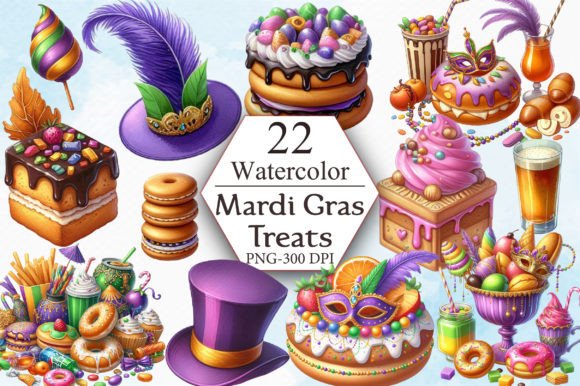
If you are looking for a way to bring the festive spirit of Mardi Gras into your creative work, Mardi Gras Fat Tuesday Treats Clipart offers a vibrant and practical solution. This digital collection captures the essence of Fat Tuesday celebrations with beautifully illustrated treat-themed graphics. Whether you are designing party decorations, creating custom apparel, or working on educational materials, this clipart set provides a polished and versatile foundation. The pack includes 22 PNG files at 300 DPI resolution, each with a transparent background and dimensions of 3600 x 3600 pixels. These specifications mean you get clean, high-resolution images that can be used across a wide range of applications without losing quality or requiring complicated editing.
What Makes This Clipart Set Stand Out
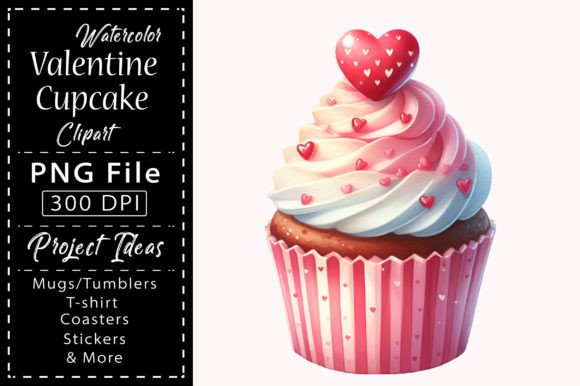
Mardi Gras Fat Tuesday Treats Clipart focuses on the indulgent and joyful side of the celebration. You will find graphics that depict classic treats like king cakes, beignets, colorful candies, cupcakes, and other sweets associated with the holiday. The artwork is designed with the traditional Mardi Gras color palette of purple, green, and gold, making it immediately recognizable and thematically appropriate. Each image is saved with a transparent background, which means you can layer them onto any project without worrying about white boxes or messy edges. This is especially useful if you plan to combine multiple elements or place the clipart over colored backgrounds, patterns, or photographs.
The resolution of 300 DPI is a professional standard for print projects. It ensures that your designs will appear crisp and detailed whether you print them on paper, fabric, or other materials. The generous canvas size of 3600 x 3600 pixels gives you plenty of room to scale the images up or down while maintaining clarity. If you are a beginner, this means you can work with these files confidently without needing advanced technical knowledge. If you are an experienced designer, you will appreciate the flexibility and quality that comes with properly prepared assets.
Who Can Benefit from This Clipart Collection
This clipart set is designed for a broad audience. Beginners and casual users will find the files easy to work with because they do not require complex software or editing skills. You can simply unzip the folder, open the PNG files, and start using them immediately. Entrepreneurs and small business owners who sell custom products on platforms like Etsy, Amazon, or at local markets will find these graphics useful for creating merchandise quickly. Freelancers and graphic designers can incorporate the clipart into client projects such as party invitations, social media graphics, and promotional materials. Educators and hobbyists can use the images for classroom activities, bulletin boards, or personal crafting projects. The accessibility of the format means that anyone with basic computer skills can produce professional-looking results.
Practical Ways to Use Mardi Gras Fat Tuesday Treats Clipart
The versatility of this clipart set allows for many practical applications. Here are some realistic ways you can use these files in your own work or business.
Custom Apparel and Accessories
If you make or sell t-shirts, tote bags, aprons, or hats, these clipart images can be used to create Mardi Gras-themed designs. Because the files have transparent backgrounds, you can place the treat graphics anywhere on a garment without awkward edges. For example, a king cake illustration centered on a t-shirt, paired with a simple Mardi Gras greeting, makes an appealing design for Fat Tuesday parties or parades. You can also scale the images to fit different product sizes, from small stickers to large back-prints on hoodies.
Party Decorations and Invitations
Throwing a Mardi Gras celebration or helping a client plan one? These clipart images can be used to design birthday cards, party invitations, banners, cupcake toppers, and place cards. The treat-themed graphics fit naturally into a party context, and the high resolution ensures that even large format decorations like posters or banners will look sharp. You can combine several images to create a cohesive visual theme across all your party materials.
Home Decor and Wall Art
Frame-worthy wall art is another great use for this clipart. With the large canvas size and high resolution, you can print individual images as standalone pieces or arrange multiple treats into a collage. A framed print of colorful Mardi Gras treats can add a festive touch to a kitchen, dining area, or party room. Sublimation on ceramic tiles, coasters, or glass pieces is also possible, giving you more options for custom home decor products.
Digital and Social Media Content
Bloggers, content creators, and social media managers can use these images to enhance posts, stories, or website graphics. The transparent backgrounds make it easy to overlay clipart on photos or branded backgrounds. You can create quote cards, announcement graphics, or themed email headers for Mardi Gras campaigns. Because the files are PNG with transparent backgrounds, they work well in Canva, Photoshop, or even simpler tools like Microsoft Word or PowerPoint.
Sublimation Products
Sublimation printing has become popular for creating custom mugs, coasters, mouse pads, and other items. The high resolution and transparent background of these clipart files make them suitable for sublimation transfers. You can design a mug with a colorful beignet graphic, or create a set of coasters featuring different Mardi Gras treats. The 300 DPI resolution ensures that the printed image will be vibrant and detailed on the final product.
Stickers and Labels
Stickers are a simple and profitable product category. With these clipart images, you can design individual stickers or sheets featuring multiple treat graphics. The transparent background means the sticker shape can follow the outline of the treat itself, which looks much more professional than a rectangular sticker. You can sell these online or use them as freebies with other purchases.
Important Considerations Before Using the Clipart
While Mardi Gras Fat Tuesday Treats Clipart is designed to be user-friendly, there are a few things to keep in mind to get the best results.
File format and handling are the first considerations. The images come in a ZIP file, so you will need to extract them before use. On most computers, you can simply right-click the ZIP folder and select "Extract All." This is a standard process, but if you are new to digital files, it helps to know that the PNG files inside are ready to use after extraction. No additional software is required to open them, though a basic image editor will allow you to resize, rotate, or combine the graphics.
Resolution and scaling are worth understanding. At 3600 x 3600 pixels, these images are quite large. You can safely reduce their size without losing quality, but enlarging them beyond the original dimensions may result in pixelation. For most projects, the original size is more than adequate. If you are printing on larger surfaces like banners, you can still use the images effectively by keeping them at a reasonable scale within your design.
Transparency is a key feature, but it works best when you save your final design in a format that supports transparency, such as PNG. If you export your project as a JPEG, the transparent areas will become white. Keep this in mind when preparing files for printing or sharing online. For sublimation, the transparent background is particularly helpful because it allows the design to blend into the product surface.
Licensing and usage rights should also be reviewed. While this description indicates that the files can be used for t-shirts, birthday cards, party decorations, mugs, wall art, templates, stickers, frame artwork, and sublimation products, it is always good practice to confirm the specific license terms provided by the seller. Most clipart sets for commercial use allow you to create and sell finished products, but restrictions may apply to certain uses such as reselling the digital files themselves. Understanding these terms helps you use the graphics confidently and legally.
Finally, consider how the clipart integrates with your overall design style. The Mardi Gras Fat Tuesday Treats Clipart has a colorful, celebratory aesthetic that works well for festive projects. If you are designing something that requires a more subdued or minimalist look, you may want to pair these graphics with clean layouts and simple typography to balance the visual energy.
Getting Started with Your First Project
If you are new to using digital clipart, start with a simple project to build your confidence. Choose one image from the set, such as a king cake or beignet, and place it on a blank canvas in your preferred design software. Resize it to fit a standard card or t-shirt layout. Add a short text greeting like "Laissez les bons temps rouler" or "Happy Mardi Gras" using a complementary font. Export your design as a high-quality PNG and review it at 100% zoom to check the details. This small exercise will help you understand how the transparent background works and how the image responds to scaling.
As you become more comfortable, you can experiment with layering multiple images, adding shadows or outlines, and combining the clipart with other design elements. The 22 images in the set give you enough variety to create cohesive collections or themed bundles. Whether you are producing items for your own use, for gifts, or for sale, the Mardi Gras Fat Tuesday Treats Clipart provides a reliable and attractive foundation for your creative work.
This clipart set is a practical tool for anyone who wants to celebrate Mardi Gras through design. Its high resolution, transparent backgrounds, and festive subject matter make it suitable for a wide range of personal, professional, and commercial projects. By understanding the file specifications and considering your specific needs, you can make the most of these graphics and produce results that look polished and intentional.