Mastering the 2025 Mini Calendar Design Studio™ for Custom Calendar Creation
The shift toward hyper-personalized print products has never been more pronounced, and few tools capture this trend as effectively as the 2025 Mini Calendar Design Studio™. Whether you are a seasoned graphic designer, a small business owner exploring new revenue streams, or a hobbyist looking to craft meaningful gifts, this collection of PSD templates offers a structured yet flexible foundation. The premise is simple: take the provided templates, customize them in Photoshop or Photopea, and produce either physical mini calendars or digital printables. But the depth of possibility reaches much further than that initial description suggests.
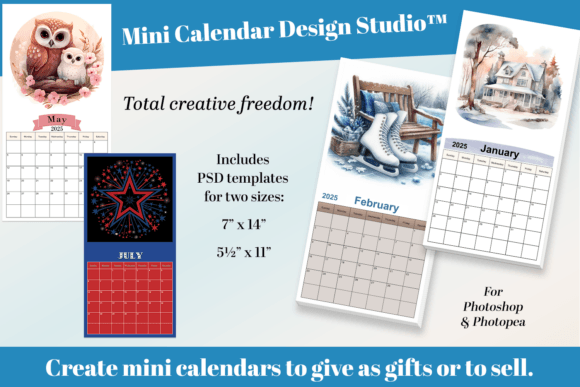
Mini calendars occupy a unique niche. They are compact enough to fit into a wallet, stick to a refrigerator with a magnet, or slip inside a greeting card envelope. Yet they remain fully functional as annual planning tools. The 2025 Mini Calendar Design Studio™ capitalizes on this duality by providing two distinct template sizes: 7 x 14 inches and 5½ x 11 inches. Both dimensions are engineered to print cleanly on a standard home printer, which removes a significant barrier for creators who do not have access to professional printing equipment. You can design, proof, and produce a finished product entirely from your own workspace.
Understanding the Two Template Sizes and Their Practical Roles
Size selection is not merely a matter of preference; it directly influences how the calendar will be used and perceived. The 7 x 14 inch template creates a long, narrow layout that feels modern and shelf-friendly. It works well for desk stands, narrow wall spaces, or as an insert in a planner cover. The 5½ x 11 inch template is closer to a standard half-sheet of letter paper, making it highly efficient for printing multiple calendars per page. If you are producing a batch of twenty calendars for a craft fair or a family reunion, this size minimizes paper waste and speeds up the cutting process.
Both templates come with pre-aligned guides for trimming. The margins, grid spacing, and date boxes are already locked into the PSD layers. You do not waste time rebuilding the calendar structure from scratch. Instead, you focus entirely on the creative layer—the images, the typography, the color palette, and any decorative elements that give the calendar its personality. This separation of structural work from artistic work is what makes the 2025 Mini Calendar Design Studio™ a productivity enhancer rather than just another template pack.
Color Space Modes for Digital and Print Workflows
One of the more technical yet crucial features of this template set is the inclusion of both CMYK and RGB Color Space modes for each size. For anyone who has ever designed a calendar only to find that the printed colors appear dull or shifted, this feature alone can save hours of frustration. RGB is the color space of screens: monitors, tablets, and phones. If you plan to sell your mini calendars as digital downloads or display them in an online shop mockup, the RGB version preserves the vividness of your original design. CMYK is the color space of ink on paper. When you switch to the CMYK version of the same template, you see a more realistic preview of how the final printed piece will look under typical lighting conditions.
Having both modes available within the same template set means you can design once and then switch to the appropriate mode for your output without rebuilding the file. Many designers prefer to work in RGB for the creative phase because it offers a wider gamut of colors, then convert to CMYK for the final print-ready file. The 2025 Mini Calendar Design Studio™ supports this workflow natively by giving you separate PSD files for each color space. You simply open the version that matches your current stage in the production process.
Workflow Considerations for Photoshop and Photopea Users
The templates are provided as PSD files, which means they are fully editable in Adobe Photoshop. However, the product explicitly mentions compatibility with Photopea, the free browser-based editor that supports PSD layers. This is a significant accessibility point. Not everyone can afford a Creative Cloud subscription, and Photopea handles layer masks, adjustment layers, and text layers well enough for this kind of project. If you are a creator on a tight budget, you can still produce professional-grade mini calendars without paying for premium software.
When you open the template in either application, look for the following components in the layer panel:
- Background layer – This is where your main artwork or pattern lives. You can replace it with a photo, a gradient, or a solid color.
- Date grid layer – The actual calendar numbers and day labels. These are typically grouped so you can adjust font style, size, and color without disturbing the alignment.
- Trim guides layer – Visible markers that indicate where to cut after printing. You can hide or delete this layer before exporting for digital sales.
- Optional decoration layers – Some versions include placeholder graphics like frames, ribbons, or icons that you can keep, replace, or remove.
The organizational logic of the PSD files follows standard naming conventions, so even if you are new to the software, you can navigate the layers by name. For batch production, you can duplicate the file and swap out the background images while keeping the calendar grid intact. This is how sellers create themed collections—one base template turned into a dozen different designs by changing only the imagery.
Real-World Applications and User Scenarios
The range of people who can benefit from this template set is broader than one might assume. A wedding photographer, for instance, could take the 5½ x 11 inch template, insert a favorite engagement photo from each month of 2024, and produce a year-end gift for clients that doubles as a marketing piece. A small soap or candle maker could design mini calendars featuring product photography and hand them out with every purchase, embedding a seasonal reminder that keeps the brand top of mind throughout the year. Teachers have used similar templates to create classroom calendars with student artwork, turning a functional classroom tool into a fundraising item.
For the creator focused on digital sales, the RGB version of the template is ideal for Etsy listings or Gumroad products. Buyers download the file, personalize it themselves, and print at home. This is a low-effort, high-margin model because you create the template once and sell it repeatedly. If you are selling physical printed calendars, the CMYK version ensures color accuracy when you outsource to a print shop or run them through your own printer. The dual-size approach also allows you to offer a budget-friendly smaller size and a premium larger size within the same product line, increasing average order value without developing an entirely new design.
Printing at Home vs. Professional Printing
Because the templates are specifically designed to print well on a home printer, a few practical considerations will help you get the best results. First, use paper with a weight of at least 80 lb cover stock if you want the calendar to stand upright or feel substantial. Standard copy paper is too flimsy for a standalone calendar that will be handled throughout the year. Second, check that your printer driver is set to the correct paper size. The 7 x 14 inch template requires legal-size paper or a sheet that can accommodate that length. If your printer does not support legal size, you can print on letter paper and trim, but you will lose part of the layout unless you scale down, which changes the intended proportions.
For creators who plan to sell physical calendars in larger quantities, professional printing is still an option. The CMYK files are print-ready and can be uploaded directly to most online print services. Request a proof before placing a bulk order to confirm that the trim guides align with the service's cutting standards. Because the templates are built with standard bleed and margin allowances, they comply with the requirements of most commercial printers without modification.
Personalization Strategies That Add Value
Personalization is the primary selling point of the 2025 Mini Calendar Design Studio™, and there are several layers of customization worth considering. At the most basic level, you can add a name, a monogram, or a short message to the cover or footer of the calendar. This makes each copy feel bespoke. For a gift, you might use a photo of a pet, a vacation landmark, or a child's drawing as the monthly image. For a business, you could embed seasonal promotions or QR codes that link to landing pages. The grid itself can also be customized: you can highlight specific dates like birthdays, anniversaries, or holidays with colored markers or icons. Since the calendar grid is fully editable in the PSD, nothing is locked.
Another approach is to create a cohesive series. For example, a floral theme with twelve different botanical illustrations, one per month, all using the same typography and color palette. This is the kind of product that sells well as a set. You can offer the full year as one file, or package individual months as standalone printables. Because the template sizes are fixed, buyers can mix and match months from different collections without worrying about inconsistent dimensions. The consistency of the underlying grid structure ensures a uniform product regardless of the visual theme applied.
Considerations for Selling Printables vs. Physical Goods
If you choose to sell digital printables, you eliminate inventory and shipping costs, but you also rely on the buyer to print the calendar correctly. To reduce support requests, include a simple instruction sheet within the download that explains paper size recommendations, printer settings, and trimming steps. You can also provide a preview image that shows the final printed product, so the buyer knows exactly what to expect. For physical goods, you control the print quality and can add finishing touches like corner rounding, hole punching for hanging, or backing with magnet sheets. The margin per physical calendar is lower than a digital download, but the perceived value is higher, and customers often appreciate receiving something ready to use.
Both business models are viable, and many creators operate both simultaneously. The same PSD file can generate a digital download listing and serve as the source file for a batch of printed calendars. The 2025 Mini Calendar Design Studio™ does not impose any licensing restrictions that would prevent you from selling the output, whether as a template or as a finished product.
Observations on Design Trends for 2025 Calendars
Looking ahead to 2025, certain aesthetic directions are gaining traction in the print design space. Minimalist layouts with plenty of white space and sans-serif typefaces remain popular for desk calendars because they are easy to read at a glance. On the other end, maximalist designs with layered textures, hand-drawn elements, and bold color contrasts are trending for wall calendars and gift items. The templates in this set are neutral enough to support either direction. Because the date grid is clean and unobtrusive, it does not fight against heavy decorative elements. If you prefer a minimalist look, you can use a simple background and let the typography carry the design. If you lean maximalist, the grid acts as an anchor that keeps the layout readable.
Another observation is the growing interest in functional design: calendars that are not just pretty but also include habit trackers, meal planning sections, or small note areas. With the base PSD files, you can add extra boxes or columns alongside the calendar grid. The 5½ x 11 inch template is particularly well-suited for this because it leaves room on one side for supplementary content. You can create a mini calendar that doubles as a mood tracker or a reading log, appealing to the journaling community that actively seeks planners with hybrid functionality.
Practical Limitations to Keep in Mind
While the templates are robust, no tool is without constraints. The date grids are pre-set for the year 2025, so they are not reusable for other years without manually updating the numbers and day placements. If you plan to sell calendars for 2026 or beyond, you will need to produce new versions. Additionally, because these are raster PSD files rather than vector files, scaling them beyond the intended print size may introduce pixelation. They are optimized for the stated dimensions, so resist the urge to enlarge them significantly for larger format prints.
Users who are completely unfamiliar with layers and adjustment panels may face a learning curve. However, the availability of free tutorials for both Photoshop and Photopea mitigates this issue. The template structure is logical, and once you understand how to replace a background image or edit a text field, the rest of the process follows naturally. The 2025 Mini Calendar Design Studio™ lowers the technical barrier for entry, but some basic familiarity with layer-based editing is still assumed.
The value of this template set ultimately lies in the flexibility it offers across multiple use cases: commercial selling, personal gifting, branding, and creative exploration. By providing two sizes, two color space versions, and a file format compatible with both paid and free software, it accommodates a wide range of skill levels and production goals. Whether you are looking to launch a small print business, create a memorable present for family and friends, or simply design your own wall calendar for the coming year, the foundation is already built. Your role is to bring the visual identity and the personal touches that turn a functional grid of dates into something worth keeping on display for all twelve months.